GA4 for This Blog: A Page View Does Not Capture Language Choice
The English and Vietnamese versions of an article share one URL on this site. When a reader switches language, the page does not reload, so another page_view is not generated. Counting page views alone therefore cannot answer which language the reader chose.
This is the practical consequence of GA4’s event-based model: measurement begins with a decision and the interaction that represents it, not with a list of available reports.
The blog needs four measurements, not every possible event
| Reader behavior | Measurement | Decision it supports |
|---|---|---|
| Opens an article | page_view with page path and title |
Which articles attract visits? |
| Changes EN/VI | A custom language_change event |
Which language is actively selected on each article? |
| Reaches the end of a long article | A defined reading-depth event | Which articles are opened but not substantially read? |
| Opens Finance in Banking | A dedicated navigation event | Does the blog lead readers to the interactive banking project? |
The current site has the Google tag and standard page collection, but its language-switch code does not send a custom analytics event. language_change is therefore a measurement proposal, not a claim about data already being collected.
The reporting funnel asks three different questions
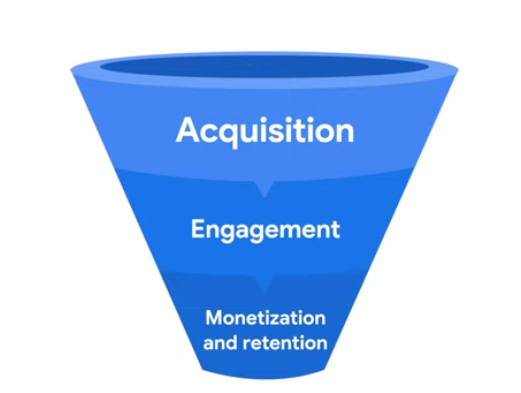
- Acquisition: which channels bring users to the site?
- Engagement: which pages and interactions hold their attention?
- Monetization and retention: which users become customers, and how often do they return?
These stages should not be collapsed into one traffic number. Acquisition explains arrival, engagement explains behavior after arrival, and retention explains whether users come back.
For a personal technical blog, monetization is not the first useful goal. Article discovery, meaningful reading, language preference, and navigation to a project are closer to the actual decisions the site can improve.
Events are the data model, but sessions still exist
Standard Universal Analytics stopped processing new data on July 1, 2023. It organized reporting mainly around sessions and pageviews. GA4 represents interactions such as page views, clicks, scrolls, and key events as events. Event parameters carry additional context about each interaction.
It is more accurate to say that GA4 is event-based than to say that it has no sessions. GA4 still reports session-related metrics; they are derived within its event-based model.
This distinction matters when moving an old report. A UA metric should not be copied into GA4 merely because a field has a similar name—the event definition and session logic may have changed underneath it.
It also matters on this site. A language change is an event inside one page session; inventing a second page view would inflate content traffic and still fail to describe what happened.
GA4 connects web and app behavior through the same model
An event-based structure can represent interactions from websites and applications without requiring pageviews to be the central unit. Reports then aggregate those events into dimensions and metrics:
- A dimension describes an event or user, such as page title, country, or traffic channel.
- A metric counts or measures it, such as active users, views, event count, or sessions.
The useful question is therefore not “Which report should I open?” but “Which event, parameter, dimension, and metric represent the behavior I want to understand?”
Parameters need a reporting plan
A language_change event could carry the selected language and page path. Sending a parameter does not automatically make every custom value convenient to use in standard reports; a corresponding custom dimension may be needed when that parameter must be analyzed as a reporting dimension.
Event names and parameters should remain stable after release. Changing language_change to several similar names later would fragment one behavior across multiple rows. The event should also avoid personal or customer information; article language and page path are sufficient for this question.
Collection and consent are separate decisions
The site’s language preference is stored locally for functionality. Analytics storage is a different purpose. The current Google tag loads directly from the shared page head, so any consent behavior required for the intended audience and configuration must be designed explicitly rather than assumed from the presence of a privacy page.
Continue with the implementation on this site
The next note shows how I added the Google tag once to the shared Jekyll layout and verified the data in GA4: Set up GA4 on GitHub Pages.
References: Google Analytics Help — events, Google Analytics Help — custom dimensions and metrics, and Google Analytics Help — consent types.